Where can I find my Navigo pass ID on Smartphone?
To link my Navigo pass on Smartphone to my partner services, I would need my smartphone ID.
To view it on your smartphone :
1. I open the Île-de-France Mobilités app
2. I log in to my account
3. I access the My Space section
4. I select "Manage my tickets" in the "My tickets and receipts" section or "My media" in the "Manage my account" section, depending on the version of my Île-de-France Mobilités application.
5. I determine the medium for which I want to find the identifier among those listed, thanks to the device and the tickets associated with each medium
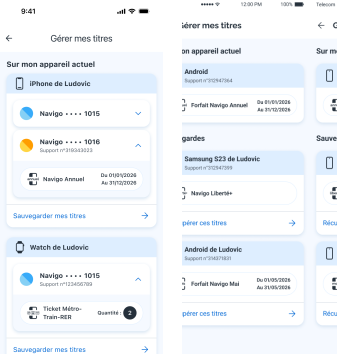
iOS user on the right - Android user on the left.
6. I find my support number under the name of the support
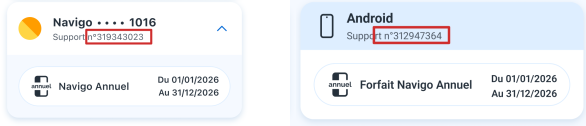
iOS user on the right - Android user on the left.