I can't travel with my Navigo Annual Pass on my phone
If you have the menu My space > CONSULT my Annual Navigo. This means that you have successfully completed the transfer journey. You can also see it from the Tickets/On My Phone/On My iPhone menu.
If you have the Navigo Annual Pass charged on your phone and are having trouble validating, you can find the answer to your question here https://www.iledefrance-mobilites.fr/aide-et-contacts/valider-avec-son-telephone
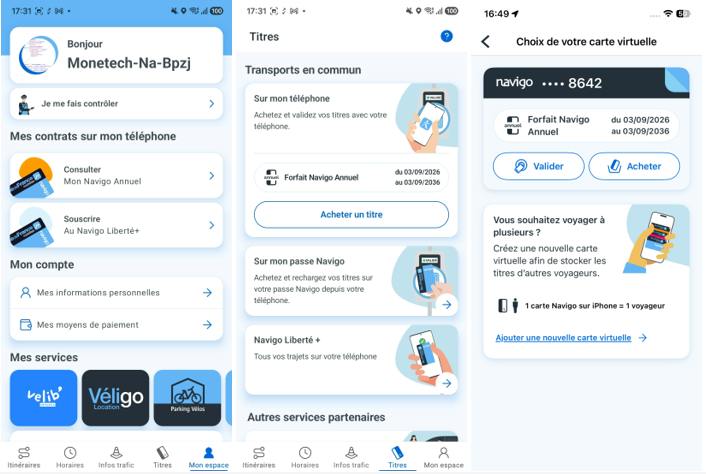
If you have the menu My Space > TRANSFER my Annual Navigo, it means that we have not completed the transfer to this phone, or that following an operation you have deleted the package on your phone.
On an Android phone, if you have deleted the My Navigo Tickets app or if you have backed up the contents of your phone,this deletes the transport tickets loaded on your phone.
You can pick up your Navigo Annual Pass from the Île-de-France Mobilités mobile application, without having to go to the agency:
Go to My Space> Manage My tickets > Retrieve My tickets: The app guides you through the next steps.
On iPhone, if you have deleted the virtual card that hosted the Navigo Annual Pass from the Apple Cards application, then You can retrieve your Navigo Annual Pass from the Île-de-France Mobilités mobile application, without having to go to the agency:
You can recover your Navigo Annual Pass from the Maps app by selecting the (+) button > Previous Maps and thenselect the backup you want to recover.