Everything you need to know about transferring the Navigo Annual to your phone

Updated on Jul 02 2026

Can I transfer my Navigo Annual Pass to my phone? And how to proceed?

If you already have a valid Navigo Annual Pass on pass, you can transfer it to your Android phone or iPhone to travel with it.

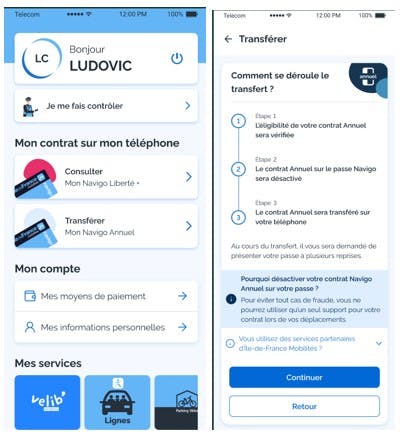
The transfer of the Navigo Annual Pass is only possible from the Île-de-France Mobilités mobile application from the menu My space > Transfer my annual Navigo.

It is the holder of the Navigo Annual Pass, and not the payer if it is different, who can transfer the Navigo Annual Pass to their mobile.

Before you start the transfer journey, make sure you meet the requirements. Anyway, don't worry, the app will do these checks and guide you every step of the way:

  • Have an account on the Île-de-France Mobilités website >Mon Espace > Navigo https://www.jegeremacartenavigo.iledefrance-mobilites.fr/espace_client/
  • Be authenticated on the Île-de-France Mobilités application with the same identifier (email address),
  • Have saved a photo associated with your Île-de-France Mobilités Connect account from the mobile application,
  • Have a mobile phone compatible with the ticket purchase service: Android
  • Not having a suspended contract on the past or being in unpaid debt not regularized

The transfer takes place in three stages and requires presenting the pass several times:

1. Due diligence. The application does several checks to ensure that everything is in order before making the transfer and guides you when your intervention is necessary.

2. Deactivation of the Navigo Annual Pass on the physical pass,

3. Loading the Navigo Annual Pass on the phone. You can then use your mobile to travel on the Île-de-France transport network.

4. To avoid any case of fraud, the Navigo Annual Pass is active to travel on only one device at a time: the physical pass OR the phone.

Remember to keep your Navigo Annual pass, it can be used again if you change your mind. See how to look back on the past. 

In the event of an interruption in the transfer process, return to the starting point My Space> Transfer my Annual Navigo, the application will make the necessary checks to resume in the right place.

Why do I need to save a photo? Because the Navigo Annual Pass is personal and non-transferable, you must have registered your photo associated with your Île-de-France Mobilités Connect account. During a check, you may be asked to display it in the mobile app (see check)

Some examples of situations that do not allow you to transfer the Navigo Annual Pass to your mobile:

  • If you have just requested a modification of your contract such as a change of zone or trade-in,
  • In the event of a contract suspended on the past,
  • In the event of unpaid debts that have not been regularised.

Once the requested modification is effective on the pass, the contract is resumed or the payment regularized, you can transfer the contract to your mobile.

Again, no surprise, the mobile application explains why this is not possible. If you have any questions, you can check the status of your contract on the Personal Space on the Île-de-France Mobilités website > Mon Espace > Navigo.

How do I travel if my phone is lost or stolen with my Navigo Annual Pass?

Wearer of an Android phone or smartwatch

In the event of loss/theft of your phone on which your Navigo Annual Pass was loaded, you must first declare it from https://mon-espace.iledefrance-mobilites.fr/declaration-sav or from the mobile application on another phone, by authenticating yourself on your Île-de-France Mobilités Connect account from My Customer Service > area> A problem with my support or my tickets> My phone> I lost my support.

You can do this from a loaner phone, remember to log out at the end of the process.

As soon as you have a phone that supports the service, you can put your Navigo Annual Pass back on it from the Customer Service menu> A problem with my support or tickets> My phone> I want to recover the contents of an old media.

To continue travelling without waiting for a compatible phone, you can go to a sales agency, RATP points of sale or Navigo SNCF Service Desks. The agent will register the declaration of loss/theft and may give you a new Navigo Annual pass to continue travelling. You will be able to transfer your Navigo Annual Pass again once you have a compatible phone.

To report a loss or theft https://mon-espace.iledefrance-mobilites.fr/declaration-sav

How do I suspend or resume my Navigo Annual Pass loaded on my phone?

You can make your request for suspension or resumption as you do today, from the Payor's Personal Space on the Île-de-France Mobilités website.

The mobile application offers you a link to access it directly: My Space> Consult my Annual Navigo > Manage my contract online.

After completing your application in the Personal Space, you must return to the Île-de-France Mobilités My Space> Consult my Annual Navigo application for the requested change to be taken into account in the telephone. It will then be effective on the desired date.

As long as you do not return to the app, the change will not be effective on your contract loaded on the phone.

Updating your Navigo Annual Pass loaded on the phone does not require you to switch to a vending machine.

Learn more

How do I change the zone of my Navigo Annual Pass loaded on my phone?

You can make your request for a change of zones as you are today, from the payer's Personal Space on the Île-de-France Mobilités website.

The mobile application offers you a link to access it directly: My Space> Consult my Annual Navigo > Manage my contract online.

After completing your application in the Personal Space, you must return to the Île-de-France Mobilités My Space> Consult my Annual Navigo application for the requested change to be taken into account in the telephone. It will then be effective on the desired date.

As long as you do not return to the app, the change will not be effective on your contract loaded on the phone.

Updating your Navigo Annual Pass loaded on the phone does not require you to switch to a vending machine.

Learn more

How do I carry out the other operations related to the payment of my Navigo Annual contract loaded on my phone?

You can carry out the acts related to the management of the contract as today from the payer's Personal Space on the Île-de-France Mobilités website:

  • change bank details,
  • regularize a debt/unpaid debt,
  • update your personal data,
  • terminate the contract.

Find out more about the Annual Navigo

Can I put my Navigo Annual Pass back on my pass?

If you change your mind and prefer to go back to the Navigo pass, don't worry, you have the right to transfer it from the Île-de-France Mobilités mobile application My space > Navigo Annuel > Transfer the contract to my Navigo pass, provided you have kept your Navigo Annual pass.
This return operation is only possible once a month.

The journey back to the pass is similar to that of the transfer to the mobile and therefore takes place in three stages:

1. Due diligence. The app checks and guides you when your intervention is necessary.

2. Deactivation of the Navigo Annual Pass on the phone,

3. Loading the Navigo Annual Pass onto your pass. You can once again use your annual Navigo pass to travel on the Île-de-France transport network.

If you have lost your physical pass, you can go to a sales agency, RATP points of sale or Navigo SNCF Services Ticket Office to give the Navigo Annual Pass on a new pass.

Can I travel if my Android phone runs out of battery?

If your tickets are stored in your phone's secure element or SIM card, many phone models allow you to validate even if the battery is empty.
If your tickets are stored in the My Navigo Tickets complementary application, it is necessary for your phone screen to be turned on to validate a ticket, but the transport application does not need to be opened.

In the event of an inspection, if you have a Navigo Monthly Pass or Navigo Week pass, you must be able to display your photo in the application (My Account) to present it to the controller.

How to contact the Navigo Annual Agency?

For questions about the Navigo Annual Pass, see the FAQ section: Navigo Annual Pass.

We recommend that you read them before contacting the Navigo Annuel Agency.

You can access many online services on "My Space" >> "My Navigo", such as downloading a certificate, renewing your pass, suspending or terminating your pass, declaring the loss/theft of your pass, updating your contact details, etc.

Application for the Navigo Annual Pass

For any other request concerning your Navigo Annual Pass and requiring contact, the Navigo Annual Agency can be reached by:

  • telephone, 09 69 39 22 22 (non-surcharged call), Monday to Friday from 8:00 a.m. to 8:00 p.m. and Saturday from 9:00 a.m. to 8:00 p.m. (non-surcharged call),
  • postal mail to the following address:
    ANNUAL NAVIGO AGENCY
    TSA 74451
    77213 AVON CEDEX
  • e-mail, you can write to us from the contact form or directly at [email protected].

Changes to the Navigo Annual Pass

Requests for changes to the Annual Navigo Pass (photo, identity, etc.) can only be made at the carriers' sales agency, RATP point of sale or Navigo SNCF Services Desk.

Transfer my Annual Navigo

Image 1 of 1